
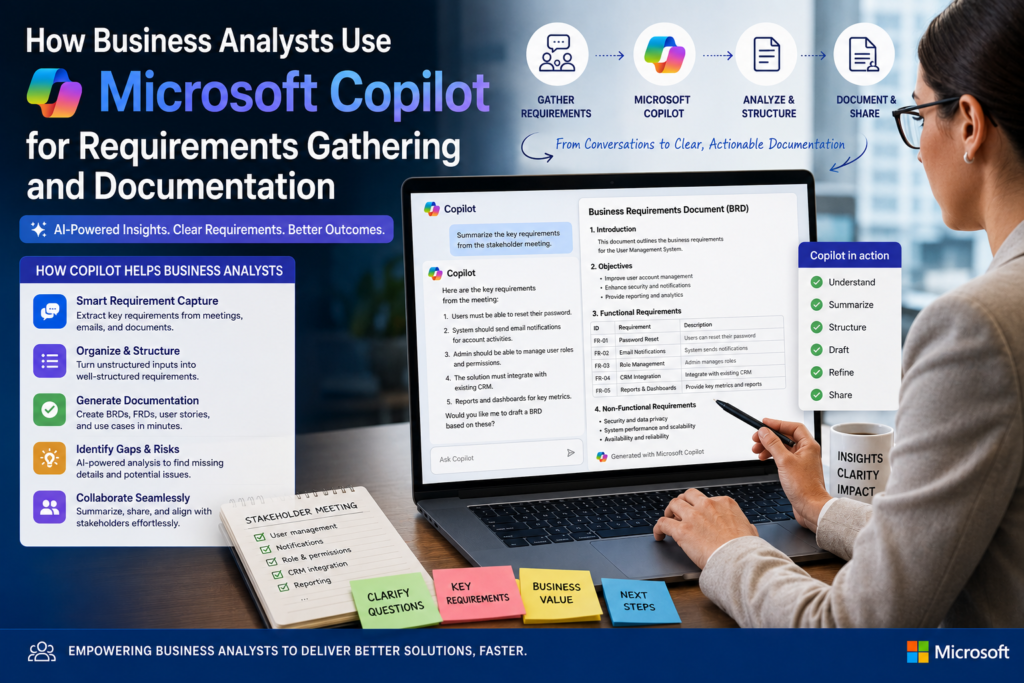

Microsoft Copilot for Business Analysts is quickly becoming part of the everyday BA toolkit. Instead of spending hours transcribing stakeholder interviews or formatting a business requirements document from scratch, BAs are using Microsoft Copilot inside Teams, Word, and Excel to speed up the parts of the job that used to eat the most time. This guide walks through exactly how Business Analysts use Microsoft Copilot for requirements gathering and documentation, with real workflow examples you can apply straight away.
If you’re building these skills from scratch, this workflow pairs naturally with the core techniques taught in our Business Analyst course.
Why Business Analysts Are Adopting Microsoft Copilot
Requirements gathering has always involved large amounts of unstructured information meeting notes, emails, whiteboard sessions, and scattered stakeholder feedback. Turning that into a clear, testable requirements document has traditionally taken hours of manual work. Because Copilot sits directly inside the Microsoft 365 tools BAs already use daily, it removes a lot of that manual overhead without requiring a new platform or workflow.
According to Microsoft’s own Copilot overview, Copilot is designed to work across the Microsoft 365 apps a BA already relies on, rather than requiring a separate standalone tool.
How Business Analysts Use Microsoft Copilot, Step by Step
1. Capturing Stakeholder Interviews in Microsoft Teams
During a discovery workshop or stakeholder interview in Teams, Copilot can transcribe the conversation in real time and generate a structured summary afterward key points raised, decisions made, and open questions still outstanding. This gives the BA a reliable record to work from instead of relying purely on handwritten notes.
2. Drafting the Business Requirements Document in Word
Once interview notes are captured, a BA can prompt Copilot in Word to organise that raw information into a structured first-draft BRD covering scope, objectives, functional requirements, assumptions and constraints. The BA still reviews and validates every line, but the blank-page problem disappears.
3. Building Requirements Traceability in Excel
Copilot in Excel can help organise a long list of requirements into a structured traceability matrix, linking each requirement back to its source and status. This is especially useful on larger projects where dozens of requirements need to be tracked through to sign-off.
4. Drafting User Stories and Acceptance Criteria
For BAs working in Agile teams, Copilot can turn a short description of a feature or stakeholder request into a draft user story with suggested acceptance criteria, giving the BA and product owner a starting point to refine together.
5. Managing Stakeholder Communication
Copilot in Outlook helps BAs draft follow-up emails, clarification requests, and project status updates quickly, keeping stakeholders informed without eating into time better spent on analysis.
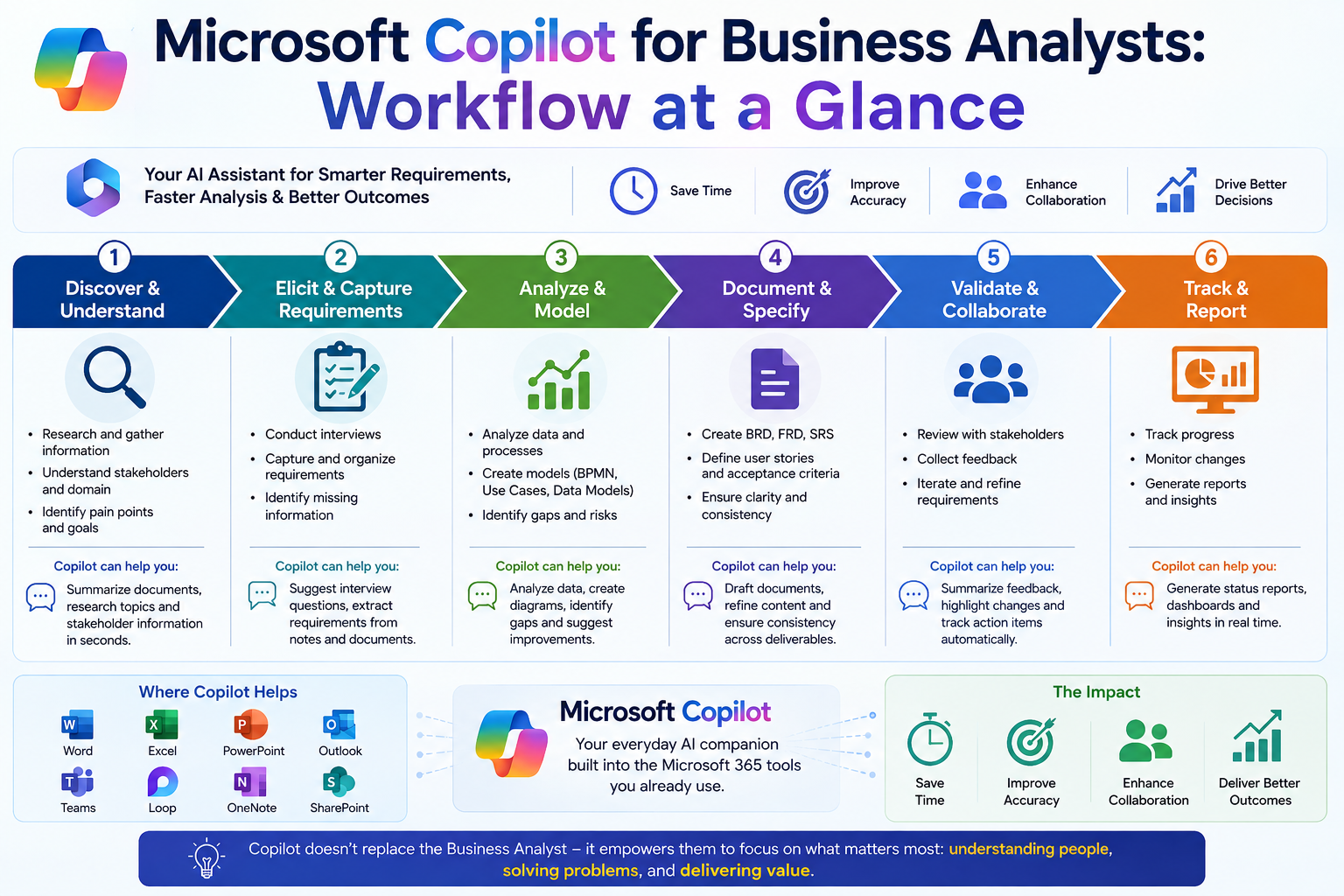
Microsoft Copilot for Business Analysts: Workflow at a Glance
| BA Stage | How Copilot Helps | Where It’s Used |
| Stakeholder interviews | Transcribes and summarises key points automatically | Microsoft Teams |
| Requirements drafting | Generates a structured first-draft BRD from notes | Microsoft Word |
| Requirements tracking | Organises requirements into tables and matrices | Microsoft Excel |
| User story writing | Suggests draft user stories and acceptance criteria | Word / Teams |
| Stakeholder communication | Drafts follow-up emails and status updates | Outlook |
| Process documentation | Turns a written process description into a draft outline | Word |
Suggested Screenshots to Add to This Post
Add original screenshots (not copied from Google Images, to keep this content plagiarism-free) at the points below. File names and alt text are pre-optimised with the focus keyword to fix the ‘Add an image with your Focus Keyword as alt text’ warning.
| Suggested Screenshot | File Name | Alt Text (Focus Keyword Included) |
| Copilot in Teams generating a stakeholder meeting summary | microsoft-copilot-for-business-analysts-teams-summary.png | Microsoft Copilot for Business Analysts summarising a stakeholder meeting |
| Copilot in Word drafting a requirements document outline | microsoft-copilot-for-business-analysts-word-brd-draft.png | Microsoft Copilot for Business Analysts drafting a requirements document |
| Copilot in Excel organising requirements into a traceability matrix | microsoft-copilot-for-business-analysts-excel-traceability.png | Microsoft Copilot for Business Analysts building a requirements traceability matrix |
| BA workflow diagram: elicitation → Copilot draft → BA review → sign-off | microsoft-copilot-for-business-analysts-workflow-diagram.png | Workflow diagram of Microsoft Copilot for Business Analysts in requirements gathering |
What Business Analysts Still Need to Do Manually
Copilot speeds up drafting and admin, but it does not replace core BA judgement. Every AI-generated requirement still needs to be validated against what stakeholders actually said, checked for ambiguity, and confirmed against business priorities before it goes into a signed-off document.
- Validating that AI-drafted requirements accurately reflect stakeholder intent
- Resolving conflicting priorities between different stakeholders
- Applying structured frameworks such as BABOK to guide the analysis
- Facilitating workshops and reading the room in live discussions
Building the BA Fundamentals That Make Copilot Useful
Microsoft Copilot for Business Analysts works best in the hands of someone who already understands requirements elicitation, stakeholder analysis and process modelling. Our Fast Start in Business Analysis and Business Analysis Techniques courses cover exactly these fundamentals, so AI tools become an accelerator rather than a crutch.
Business Analyst Training Across Australia
We deliver instructor-led Business Analyst training for learners in Melbourne, Sydney, Brisbane, Adelaide, Perth and Canberra, with flexible live online and in-house options available.
Frequently Asked Questions
How do Business Analysts actually use Microsoft Copilot?
Business Analysts use Copilot to transcribe and summarise stakeholder interviews, draft first-pass requirements documents, organise requirements in Excel, and draft user stories and stakeholder communications.
Does Copilot replace the need for BA skills?
No. Copilot speeds up drafting and admin work, but validating requirements, managing stakeholders, and applying analytical judgement remain core BA skills that AI does not replace.
What Microsoft 365 apps does Copilot support for BA work?
Copilot is available inside Word, Excel, Teams, Outlook and PowerPoint, covering most of the day-to-day tools a Business Analyst already uses.
Do I need a course to learn business analysis, or can I just use Copilot?
AI tools work best on top of solid BA fundamentals. A structured Business Analyst course gives you the frameworks needed to use Copilot’s output critically and correctly.
Final Thoughts
Microsoft Copilot for Business Analysts is changing the pace of requirements gathering and documentation faster transcription, faster first drafts, faster stakeholder communication. But the analytical judgement, stakeholder management, and validation skills that make a BA effective are exactly what AI still can’t do on its own. The most future-proof approach is to build strong BA fundamentals first, then use Copilot to work faster on top of them.
Ready to build job-ready Business Analyst skills? Enrol in a Business Analyst course today, or explore all available courses.